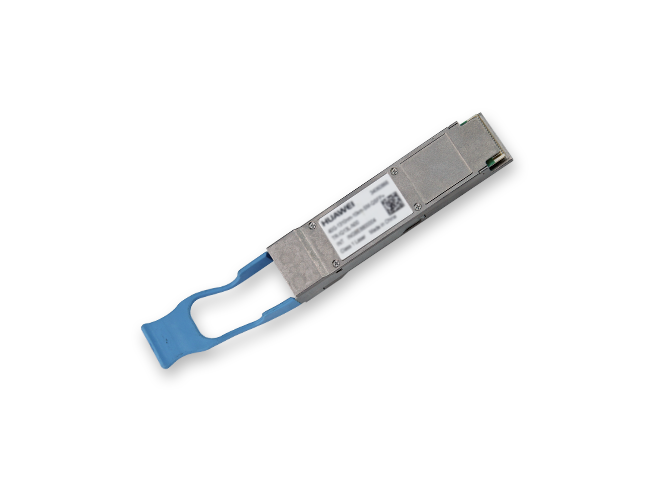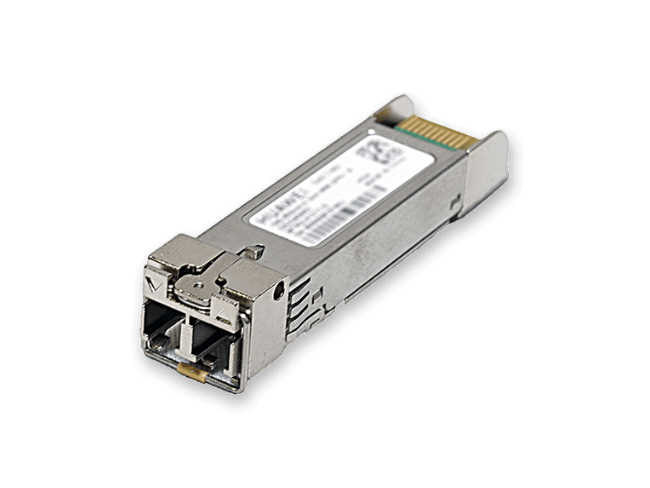
An SFP optical module is a small decision that carries a big network: pick the wrong one and you get alarms, dead ports, or a link that dies at 3 p.m. in a Middle East summer. This guide answers the 32 questions enterprise and ISP buyers ask most before ordering SFP, SFP+, SFP28, QSFP+, QSFP28, QSFP-DD, OSFP and 800G transceivers — from how compatible SFP modules get recognized by Huawei and Cisco switches, to real price differences between original and compatible modules, DDM/DOM diagnostics, industrial -40°C to +85°C ratings, and when an 800G transceiver actually makes sense. Every answer is based on vendor documentation and current 2025–2026 market data, not marketing claims. BS Comtec supplies Huawei, Cisco, NVIDIA and Accelink optical modules to buyers across Europe, South America, the Middle East, Africa and Russia.
The Top 8 Questions Buyers Ask (Quick Answers)
These are the eight concerns that most often decide whether an order goes out — ranked by how frequently they appear in vendor documentation, reseller technical material and procurement discussions.
1. Will a third-party module work in my Huawei or Cisco switch?
Yes — if it carries the right compatibility code. Huawei (HQS coding + SFP-Classifier) and Cisco (IDPROM + SHA-1 checksum) both read the module’s EEPROM at power-up; a compatible SFP module must be programmed specifically for your brand and platform. Without it, expect alarms or an error-disabled port. Full mechanism and per-vendor commands are in Group 1 below.
2. How much do compatible SFP modules actually save?
Across multiple 2026 market sources, compatible modules cost 30%–90% less than originals depending on speed and brand. A typical 10G SFP+ LR lists at $200–500+ from OEM channels versus $20–60 for a compatible unit. Details and price-quality trade-offs in Group 2.
3. Who replaces a failed module — and does using compatible modules void my switch warranty?
Compatible suppliers typically offer 3-year to lifetime warranties versus the OEM’s typical 1 year. In the US market, the Magnuson-Moss Warranty Act prevents vendors from denying hardware warranty merely because you used third-party modules. See Group 2.
4. How do I verify the modules I receive are genuine and brand-new?
Three checks: read vendor/serial data from the switch (display transceiver on Huawei/H3C), confirm the module does not trigger non-genuine alarms, and verify DDM/DOM readings are live rather than frozen. Counterfeit modules often lack digital diagnostics entirely. See Group 3.
5. The project ships next week, but the OEM quotes 4–8 weeks. What then?
This is where compatible suppliers win: mainstream speeds (1G–100G) are commonly in stock and ship in days, while OEM lead times of 4–8 weeks are typical for non-catalog volumes. See Group 2 (Q18).
6. Do compatible modules support DDM/DOM real-time monitoring?
Quality ones do. The SFF-8472 standard defines a diagnostic page reporting temperature, supply voltage, laser bias current, and Tx/Rx optical power. A missing or static DDM readout is the classic counterfeit tell. See Group 4.
7. When do I need industrial -40°C to +85°C modules?
Rule of thumb: case temperature ≈ ambient + 20°C. Long-term environments above 50°C or below -20°C — outdoor cabinets, unconditioned edge rooms, 5G sites across the Middle East, Africa or Siberian Russia — call for I-Temp industrial modules. See Group 4.
8. Which wavelength and reach class should I order?
850 nm for multimode short reach (hundreds of meters), 1310 nm for singlemode 2–10 km, 1550 nm for 40–80 km metro spans. Ordering LR when you need ER — or the reverse — is the most common selection mistake. See Group 5.
Group 1 — Compatibility & Alarm Handling (Q1–Q13)
Compatibility is the number-one buying concern because Huawei and Cisco actively verify module identity in hardware. Thirteen answers cover the mechanisms, alarms and commands for the major switch vendors.
Q1. What happens when I insert a third-party optical module into a Huawei switch?
The device raises alarm ALM-3276800044, “non-Huawei-customized optical module.” The module may still work, but Huawei documentation states it does not guarantee the behavior of non-standard modules. A properly coded compatible module avoids surprises; an uncoded one may be rejected outright.
Q2. How do I disable the non-standard module alarm on Huawei equipment?
Use the transceiver phony-alarm-disable command to suppress the alarm for non-Huawei-customized modules. Note that Huawei also warns that a module whose temperature specification does not match the device’s supported range can bring the port down (Q4) — disabling the alarm does not fix a genuine spec mismatch.
Q3. What is the unauthorized-module alarm on Huawei CE data-center switches?
Alarm ALM-4112017 (hwOpticalUnAuthorized), severity critical, applies to CE-series data-center switches produced after 2013-07-01 (QSFP+/CFP 40GE/100GE modules after 2016-01-01). Huawei’s documentation warns that unauthorized modules may behave abnormally and interrupt services, so data-center buyers should confirm coding before deployment.
Q4. What happens if a module’s temperature specification does not match my device?
Huawei officially documents that inserting a module whose temperature spec is outside the device’s supported range may cause the port to go Down. This is a real technical issue, not just a commercial restriction — check the temperature class before ordering, especially for outdoor or unconditioned sites (see Q24–Q25).
Q5. How do I allow third-party modules on Cisco switches?
Enter the global command service unsupported-transceiver, and use errdisable recovery cause gbic-invalid to recover a port that was shut down after an unsupported-transceiver event. Be aware this may affect Cisco TAC support for related issues.
Q6. What is Cisco’s IDPROM and compatibility-code mechanism?
Cisco stores an IDPROM structure in the module’s EEPROM and validates it with a SHA-1 checksum at insertion. A failed check triggers the unsupported-transceiver error and can error-disable the port. Compatible modules must precisely replicate the original vendor codes to pass.
Q7. What is Huawei’s HQS coding mechanism?
Huawei modules carry HQS extended coding fields that the host validates with SFP-Classifier logic. On mismatch, the port can enter a low-power error-disabled state rather than simply alarming. This is why brand-specific coding — not a generic code — is required for Huawei platforms.
Q8. What exactly is “programming code” (EEPROM flashing)?
It is the process of writing brand-specific vendor identification data into the module’s EEPROM A0h page (vendor name, part number, serial, transceiver type). It is the core manufacturing step that makes a compatible module recognized by the target brand’s switch. When buying, confirm your supplier codes modules per brand and per model, not with a universal code.
Q9. How do I check whether an H3C switch recognizes a module correctly?
Run display transceiver interface and compare the reported Vendor Name, Part Number and serial information with the module label. H3C’s official manuals use this as the first verification step.
Q10. How do I handle the third-party module alarm on H3C?
The alarm OPTMOD/4/PHONY_MODULE indicates a module not certified by H3C. The transceiver third-party alarm enable command controls the third-party module alarm switch.
Q11. How do I enable third-party modules on Juniper devices?
Use set chassis fpc <fpc> pic <pic> unsupported-transceiver on the relevant FPC/PIC.
Q12. How does Arista handle third-party module alarms?
Arista’s CLI provides an unsupported-transceiver command that permits non-OEM modules on a port.
Q13. Do ZTE devices need a command to accept third-party modules?
Typically no — ZTE platforms such as ZXR10 usually accept third-party modules by default. As a fallback on some platforms, set port transceiver ignore-vendor-check bypasses vendor checking.
Group 2 — Price, Warranty & Commercial Terms (Q14–Q19)
Price is the biggest driver for choosing compatible SFP modules; warranty and lead time decide whether the saving survives contact with reality.
Q14. How much money do compatible modules really save?
Published 2025–2026 sources give a range of 30%–90% less than original modules, depending on speed, brand and channel: industry guides cite 30–70%, transceiver whitepapers 60–80%, and reseller market data 70–90% for common speeds. Treat any single “guaranteed discount” claim with suspicion; ask for a quote on your exact models instead.
Q15. What is the typical price difference for a 10G LR module?
For 10G SFP+ LR (a high-volume SKU), OEM channels typically list $200–500+ per unit, while compatible equivalents sell at roughly $20–60 — a 70–90% reduction based on 2026 reseller market data. At 1G–25G the absolute gap is smaller; at 100G–800G both sides rise but the relative gap persists.
Q16. Why are original modules so expensive?
OEM pricing is estimated at 5–10× component cost. The premium funds certification, qualification testing, global service networks — and is reinforced by the coding-lock mechanism that limits which modules your switch will accept. That is the honest trade-off: originals buy vendor ecosystem assurance, compatible modules buy the same optics class at a fraction of the price.
Q17. How long is the warranty on compatible modules?
Compatible-module suppliers commonly offer 3-year to lifetime warranties, versus the OEM’s typical 1 year. Ask specifically what the warranty covers (replacement logistics, who pays shipping) before comparing price tags.
Q18. What is the delivery time difference?
OEM channels commonly quote 4–8 weeks for non-catalog volumes. Compatible suppliers usually keep mainstream speeds (1G–100G, and popular 400G SKUs) in stock and ship directly. For integrators racing a go-live date — a European data-hall fit-out or an African ISP expansion — this is often the deciding factor, not price.
Q19. If I use compatible modules, does the OEM still honor my switch warranty?
In the US market, the Magnuson-Moss Warranty Act restricts vendors from denying hardware warranty solely because third-party modules were used. A widely adopted procurement strategy is hybrid: OEM modules on critical backbone links, compatible modules on expansion and access links, optimizing CAPEX without betting the core.
Group 3 — Authenticity & Acceptance Testing (Q20–Q22)
The used/refurbished market is real. Three checks at goods-in protect you.
Q20. How do I verify a Huawei module is genuine?
Three layers: (1) read the module from the device with display transceiver and compare Vendor Name, Part Number, serial, wavelength and temperature class against the label; (2) check alarm state — a genuine module should not trigger ALM-3276800044/ALM-4112017; (3) verify serial/ESN through official Huawei channels where available. The same device-side method applies to other brands (H3C uses it as the official first step).
Q21. My genuine Huawei module triggered a non-standard alarm. Is that possible?
Yes. Huawei documentation notes that modules shipped in early periods may be misreported because their vendor information was not recorded in the device database. A one-off false alarm on a genuine part is plausible; systematic alarms across a batch warrant investigation.
Q22. Is a module without DDM readings suspicious?
Yes — treat it as a red flag. The SFF-8472 standard requires an A2h diagnostic page returning live values. Counterfeit and refurbished modules frequently lack DDM entirely or report frozen, unchanging numbers (a temperature that never moves is physically implausible).
Group 4 — Digital Diagnostics (DDM/DOM) & Industrial Temperatures (Q23–Q25)
Monitoring data and temperature class are what keep links alive after commissioning.
Q23. What does DDM/DOM monitor, and how accurate is it?
The SFF-8472 diagnostic page reports five parameters: module temperature, supply voltage, laser bias current, Tx optical power and Rx optical power. Industry accuracy figures: temperature ±3–5°C, bias current ±10%, optical power ±2–3 dB. Good enough to distinguish a dying laser, a dirty connector or a fiber break — the three most common field faults.
Q24. When must I order industrial-grade -40°C to +85°C modules?
Apply the rule of thumb: module case temperature ≈ ambient + 20°C. If your site regularly exceeds 50°C ambient (rooftop cabinets in Gulf summers, unenclosed edge rooms across Africa and South America) or drops below -20°C (outdoor plants in Russia), specify I-Temp. Also note Huawei’s warning from Q4: a temperature-class mismatch can take the port down even when the module “works.”
Q25. What do C-Temp, E-Temp and I-Temp mean?
Cisco’s industry-standard classification by case temperature: C-Temp 0°C to +70°C (standard data halls), E-Temp -5°C to +85°C, I-Temp -40°C to +85°C (industrial). I-Temp products often carry a -RGD or -I suffix in the part number. Choose E-Temp for marginal indoor sites and I-Temp for true outdoor/industrial exposure.
Group 5 — Reach & Wavelength Selection (Q26–Q28)
The most common ordering error is choosing the wrong reach class. Three answers map speed × distance × fiber.
Q26. How do I choose between 850 nm, 1310 nm and 1550 nm?
Short version: 850 nm over multimode fiber for short in-building runs (hundreds of meters — e.g. 10GBASE-SR reaches 400 m on OM4); 1310 nm over singlemode for 2–10 km (campus, metro access — 10GBASE-LR reaches 10 km); 1550 nm for long spans of 40–80 km (metro and inter-city — 10GBASE-ER reaches 40 km). Multimode is cheaper per link but distance-capped; singlemode costs more per module but spans kilometers on ordinary duplex fiber.
Q27. For 100G, should I choose SR4, CWDM4 or LR4?
Follow the fiber plant: inside the hall over MPO multimode up to 100 m (OM4), take SR4 — lowest cost and power, and each link can break out to 4×25G; up to 2 km between buildings over duplex singlemode, take CWDM4; for 10 km campus and metro spans, take LR4. All three are in BS Comtec’s current Huawei 100G lineup.
Q28. For 400G, how do FR4, SR8 and DR4 differ?
FR4 carries four CWDM wavelengths (1271–1331 nm) over a duplex singlemode pair to 2 km — the standard choice when you want 400G on ordinary duplex fiber. SR8 (multimode, 70–100 m) and DR4 (singlemode parallel, 500 m) use parallel optics over MPO, cheaper per link for in-hall fabrics but tied to MPO infrastructure. Huawei’s QSFP-DD-400G-FR4 in our catalog is the duplex 2 km workhorse.
Group 6 — New Technology: 800G, LPO, 1.6T & AI Clusters (Q29–Q32)
AI workloads changed optical purchasing math. Four forward-looking answers, including our honest take on 1.6T.
Q29. For 800G, should I buy DSP or LPO modules?
For links up to 500 m where the host platform supports linear interfaces and power is the constraint, LPO (linear drive) modules draw roughly 6–9 W versus 14–18 W for DSP-based 800G modules. For maximum platform compatibility and reach headroom, DSP remains the default. As a rule: save power with LPO, save integration effort with DSP.
Q30. Is LPO mature enough to deploy?
It is standardizing fast. The LPO MSA published its 100G-DR-LPO v1.01 specification in March 2025, and at OFC 2025 Accelink demonstrated an 800G DR8 LPO module at ≤7.5 W on the OIF pluggable-logic demo. Production deployment is concentrated in hyperscale AI fabrics; for general enterprise use, DSP remains the safer default for now.
Q31. Can I buy 1.6T modules today?
Yes — NVIDIA’s MMS4A00 (1600 Gb/s 2xDR4 OSFP, 8×200G-PAM4 electrical lanes, 1310 nm up to 500 m, supporting XDR 800 Gb/s InfiniBand) has official documentation, and industry forecasts put 1.6T volume ramp through 2026. But see our honest positioning: most data centers do not need 1.6T yet (separate article on this site).
Q32. How many optical modules does an AI cluster consume?
Huawei’s official figure: each additional GPU card adds an average of 2.5–4 optical modules. A GPT-4-scale 10,000-GPU cluster requires roughly 25,000× 200G or 40,000× 400G modules. At that multiplier, per-unit price and power (Q29) dominate TCO — which is exactly why 800G procurement decisions deserve the scrutiny in this guide.
Order With Confidence — Talk to BS Comtec
Before you order, send us your switch models, port types, target distances and quantity. BS Comtec will return a brand-matched compatibility list and a quotation — covering everything from 1G SFP to 800G OSFP modules from Huawei, Cisco, NVIDIA and Accelink — typically within one business day, with stock-and-lead-time confirmation for project deadlines in Europe, South America, the Middle East, Africa and Russia.
- WhatsApp: +86 135 8237 6986
- Inquiry form: use the inquiry form on our website
- What to include: switch model + firmware, port type, speed, fiber type, distance, quantity
1. Will a third-party module work in my Huawei or Cisco switch?
Yes — if it carries the right compatibility code. Huawei (HQS coding + SFP-Classifier) and Cisco (IDPROM + SHA-1 checksum) both read the module’s EEPROM at power-up; a compatible SFP module must be programmed specifically for your brand and platform. Without it, expect alarms or an error-disabled port. Full mechanism and per-vendor commands are in Group 1 below.
2. How much do compatible SFP modules actually save?
Across multiple 2026 market sources, compatible modules cost 30%–90% less than originals depending on speed and brand. A typical 10G SFP+ LR lists at $200–500+ from OEM channels versus $20–60 for a compatible unit. Details and price-quality trade-offs in Group 2.
3. Who replaces a failed module — and does using compatible modules void my switch warranty?
Compatible suppliers typically offer 3-year to lifetime warranties versus the OEM’s typical 1 year. In the US market, the Magnuson-Moss Warranty Act prevents vendors from denying hardware warranty merely because you used third-party modules. See Group 2.
4. How do I verify the modules I receive are genuine and brand-new?
Three checks: read vendor/serial data from the switch (display transceiver on Huawei/H3C), confirm the module does not trigger non-genuine alarms, and verify DDM/DOM readings are live rather than frozen. Counterfeit modules often lack digital diagnostics entirely. See Group 3.
5. The project ships next week, but the OEM quotes 4–8 weeks. What then?
This is where compatible suppliers win: mainstream speeds (1G–100G) are commonly in stock and ship in days, while OEM lead times of 4–8 weeks are typical for non-catalog volumes. See Group 2 (Q18).
6. Do compatible modules support DDM/DOM real-time monitoring?
Quality ones do. The SFF-8472 standard defines a diagnostic page reporting temperature, supply voltage, laser bias current, and Tx/Rx optical power. A missing or static DDM readout is the classic counterfeit tell. See Group 4.
7. When do I need industrial -40°C to +85°C modules?
Rule of thumb: case temperature ≈ ambient + 20°C. Long-term environments above 50°C or below -20°C — outdoor cabinets, unconditioned edge rooms, 5G sites across the Middle East, Africa or Siberian Russia — call for I-Temp industrial modules. See Group 4.
8. Which wavelength and reach class should I order?
850 nm for multimode short reach (hundreds of meters), 1310 nm for singlemode 2–10 km, 1550 nm for 40–80 km metro spans. Ordering LR when you need ER — or the reverse — is the most common selection mistake. See Group 5.